HyperCMD brings web-style UI development to terminal apps
A new Rust framework lets developers build terminal interfaces with HTML templates and reactive signals, cutting boilerplate by 50-70%.
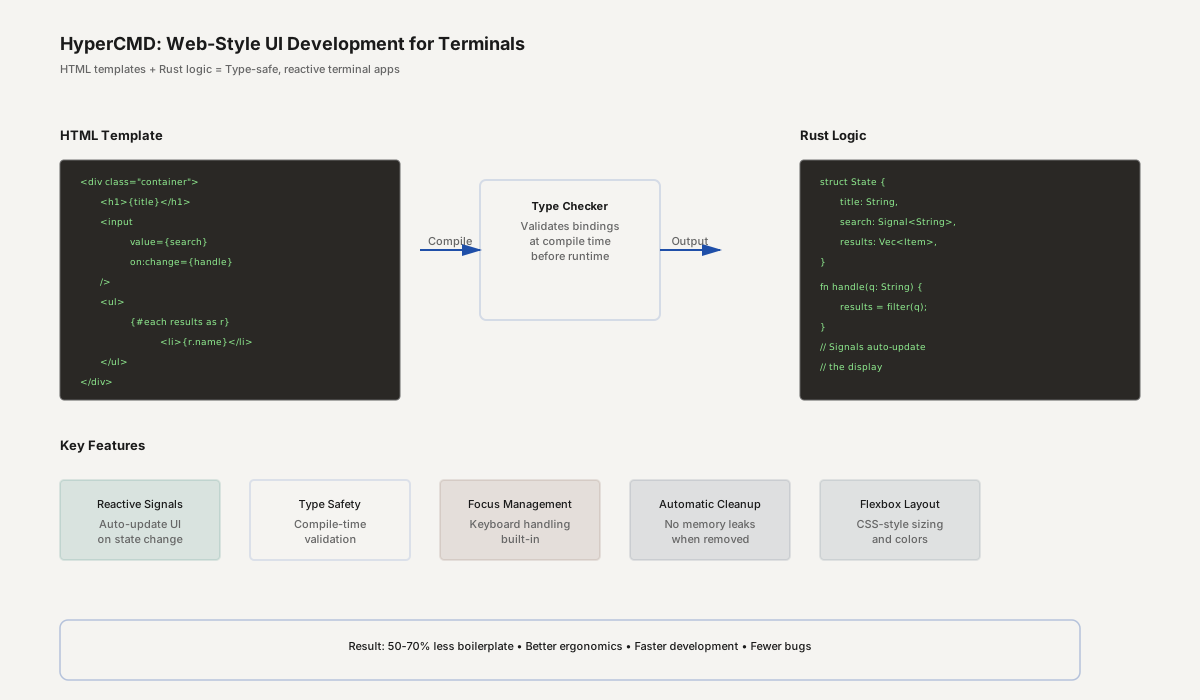
- HyperCMD uses HTML templates with Rust logic for type-safe terminal UIs.
- Reactive signals auto-update the display when state changes, eliminating manual redraw calls.
- Built-in focus management, keyboard handling, and keyboard-first design reduce boilerplate significantly.
HyperCMD inverts the conventional wisdom about building terminal UIs. Instead of writing imperative code that manipulates widgets (draw this box, put that text here, handle the click), developers write HTML templates paired with Rust logic. The framework compiles it all together, managing terminal rendering, keyboard events, and reactive state updates—much like web frameworks do for browsers, but for the terminal.
Terminal UIs deserve better abstractions
Building sophisticated terminal applications has long meant mastering low-level terminal APIs, managing raw keyboard input, and manually redrawing UI sections. Frameworks help, but most still require imperative code: "render this button at this coordinate; listen for focus; redraw on state change." It's verbose, error-prone, and hard to reuse components across projects.
HyperCMD applies lessons from modern web development: declarative markup for layout and composition, reactive signals for state management, and type-safe bindings between template and logic. The result is code that's easier to read, reason about, and modify.
Core features
HTML-based UI. Write terminal interfaces in standard HTML markup, not proprietary widget DSLs. Familiar syntax means faster development and easier collaboration.
Type-checked bindings. Rust expressions embedded in your HTML are verified by the compiler at build time. Typos and logic errors surface before runtime.
Reactive signals. When application state changes, the UI updates automatically. No manual redraw calls; no tracking which parts of the UI are stale.
CSS-like layout. A subset of CSS handles layout (flexbox), sizing, colors, and text emphasis—developers already know this syntax.
Keyboard-first design. Built-in focus management, Tab navigation, and grapheme-aware text editing. No hunting through raw terminal codes.
Automatic cleanup. When a component is removed, associated listeners, async tasks, and background workers are disposed of automatically. No memory leaks or hanging connections.
Compile-time safety. Full type checking across the entire UI. Impossible states become compile errors, not runtime panics.
Real-world applications
File browsers with rich interactivity. Filter results as you type, preview file contents, handle keyboard shortcuts—all declaratively, without manual event wiring.
System monitoring dashboards. Display live metrics, handle async updates, respond to keyboard commands—automatically reflected in the terminal display.
Administrative tools. Configuration wizards, log viewers, deployment dashboards—anything requiring keyboard-driven navigation benefits from HyperCMD's focus management and signal-based reactivity.
Development utilities. Git interfaces, build system UIs, database clients—tools that need responsive keyboard interaction and clean state management.
Reusable components. Build a checkbox, a dropdown, a text input once. Use it across multiple tools. The type system ensures correctness.
The productivity multiplier
A typical terminal UI framework forces developers to juggle three concerns: layout (where things appear), interaction (keyboard/mouse), and state (what the current condition is). HyperCMD unifies these with declarative markup and signals. This reduces boilerplate significantly—estimates suggest 50-70% less code for comparable functionality versus imperative approaches.
For teams, this means faster delivery, fewer bugs, and easier maintenance. For individuals, it lowers the barrier to building sophisticated terminal tools.
Who benefits most
Rust developers building CLI applications and admin tools gain a modern alternative to widget-based frameworks.
DevOps and infrastructure teams can build sleek dashboards and management utilities without reinventing the wheel on event handling and state management.
System administrators needing portable tools that work anywhere Unix/Linux runs—no X11, no complex dependencies.
Open-source maintainers can build polished CLI experiences that rival commercial tools, differentiating their projects.
Why it matters
Terminal interfaces power much of the infrastructure world: deployment systems, monitoring dashboards, development tools, and administrative utilities. Yet the development experience for terminal UIs lags far behind web and mobile UI tooling. HyperCMD closes that gap, bringing declarative, reactive, type-safe UI development to the terminal. This is not just about convenience—it's about raising the floor for what "good UX" means in terminal applications.
As more work happens in CI/CD pipelines, remote servers, and containerized environments, terminal UIs are more relevant than ever. Tools that make building them fast and reliable drive ecosystem innovation.
HyperCMD is open source and available on GitHub, with documentation at docs.rs.
The Appboxs newsroom covers launches, funding, acquisitions, pricing changes and AI across the SaaS and no-code world. Every story links to its primary sources. Have a tip, a correction or a story we should cover? Send it through our contact page.
Related stories
Ramen: Enterprise MCP server deployment across Kubernetes zones
Newsroom · 5 Oct 2026 · 4 min readToolWeave Router 2.0: Achieve Astra quality at half the cost with intelligent model routing
Newsroom · 5 Oct 2026 · 3 min readToolThoreau BASIC: Line-numbered BASIC with 64-bit, JIT, graphics, and MIDI synthesis
Newsroom · 5 Oct 2026 · 2 min read